How to Sign a PDF Electronically (Without Printing Anything)
The print-sign-scan ritual survives because people assume a signature has to be physical to count. In almost every case it does not. Electronic signatures have been legally recognised across the US, the EU, and the UK for over two decades, and the practical question is not whether you can sign a PDF on screen but which kind of signature the document in front of you actually requires.
Three things called "signature", ranked by strength
1. Electronic signature — a mark showing intent
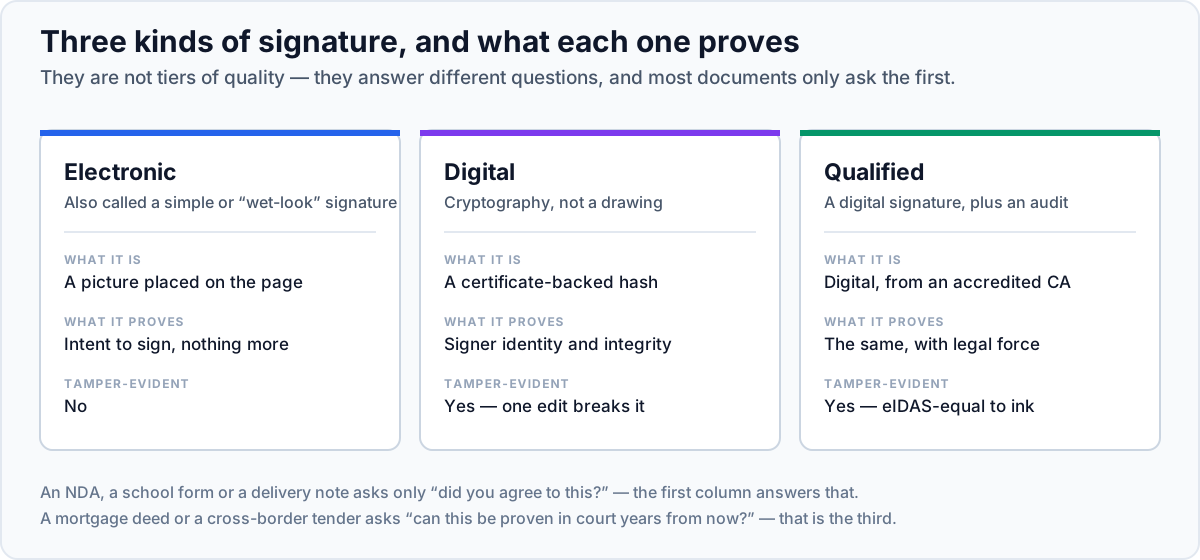
An image of your handwriting, a typed name in a script font, even a checkbox saying "I agree". Legally, an electronic signature is any symbol adopted with the intent to sign. The mark itself is not the evidence; the surrounding context — the email thread, the timestamp, the IP address, the conduct of both parties afterwards — is what proves the agreement.
This covers the overwhelming majority of everyday documents: NDAs, employment offers, supplier agreements, consent forms, school permission slips, rental applications. It is what the Sign PDF tool here produces.
2. Digital signature — cryptographic proof
A different mechanism entirely, despite the similar name. A digital signature uses a private key to compute a cryptographic hash over the document's exact bytes and embeds it in the file. Any viewer can verify two things: which certificate signed it, and that not a single byte has changed since. Alter a comma and the signature reports as invalid.
This requires a certificate from a certificate authority, which means identity verification and usually a fee. It is worth it when tamper-evidence is the point — audited financial statements, regulatory filings, documents that will be relied on years later by someone who was not in the room.
3. Qualified electronic signature — the regulated tier
Under the EU's eIDAS regulation, a qualified electronic signature is a digital signature made with a certificate from a qualified trust service provider on secure signature-creation hardware. It carries the same legal effect as a handwritten signature automatically, with the burden of proof reversed in your favour. Certain transactions — some property transfers, some public-sector filings — require this specific tier and nothing less will do.
| Type | What it proves | Typical use |
|---|---|---|
| Electronic | Intent to sign, supported by context | Contracts, forms, approvals — most day-to-day signing |
| Digital | Identity via certificate + document unchanged since signing | Financial reports, official records, tamper-evident documents |
| Qualified (eIDAS) | The above, with legal equivalence to handwriting in the EU | Regulated filings, high-value transactions in the EU |
Signing a PDF in your browser
- 1Open the document in Sign PDF
Go to Sign PDF and add your file. Contracts are exactly the sort of document you do not want sitting on someone else's server, and here it never leaves the tab.
- 2Create your signature
Draw it with a mouse, trackpad, or finger; type your name and pick a handwriting-style font; or upload a photo of a signature you have already made on paper. Drawing on a phone with your finger produces a far better result than drawing with a mouse — the tool works on mobile, so sign there and continue on desktop if you like.
- 3Place it where it belongs
Drop it onto the signature line and size it to fit. Do not cover the printed name or the date field underneath — a signature spilling over the text next to it looks careless on a document someone will file.
- 4Add the date and any initials
Most agreements want a date beside the signature, and many want initials on every page. Edit PDF handles the extra text and per-page initials.
- 5Download and check the whole document
Scroll through the finished file before returning it. Missed initials on page 4 are the single most common reason a signed contract comes back for a second pass.
Is an electronic signature legally binding?
In general, yes. The relevant frameworks are the ESIGN Act and UETA in the United States, eIDAS in the European Union, and the Electronic Communications Act 2000 in the UK. They converge on the same principle: a signature, contract, or record may not be denied legal effect solely because it is electronic.
What they require, in substance, is that the signer intended to sign, that the parties agreed to transact electronically, that the signature is attributable to the signer, and that the signed record can be retained and reproduced. An emailed PDF signed by the named party and returned from their own address satisfies all of that comfortably.
The recognised exceptions are narrow and worth knowing: wills and testamentary trusts, some family-law documents, certain property conveyances, court filings with their own rules, and notarised instruments in jurisdictions that have not adopted remote notarisation. If your document is in one of those categories, check the local requirement before signing electronically. This is general information, not legal advice.

Draw, type, or upload your signature, place it on the page, and download the signed document. Nothing is uploaded to a server.
Sign a PDFPractical habits for signed documents
- Keep the email thread. With an electronic signature, the surrounding correspondence is a large part of the evidence. Archive the message you returned the document with, not just the PDF.
- Return the whole document, not just the signature page. A signature page detached from its agreement is easy to challenge and easy to reattach to something else.
- Do not store a signature image in a shared folder. It is a reusable image of your name. Treat it roughly like a card PIN.
- Check whether they wanted a digital signature. If the request says "digitally signed" or "certificate-based", an image of your handwriting will be rejected. Ask, rather than sending it twice.
- Protect it before sending, when it matters. Protect PDF will encrypt the signed document, and the permission flags discourage casual editing of the copy you sent.
Do not merge after signing
Worth stating separately because it catches people out. If a document carries a cryptographic digital signature, any subsequent change — merging, splitting, compressing, rotating — alters the bytes and invalidates it. Do all the assembly first, sign last. With a plain image-based electronic signature this does not apply, since the signature is just page content, but signing last is still the tidier order.




